Creating your first wiki
Big picture
Creating wikis is easy for server owners and mod developers alike. Wiki (or documentation) is defined by a documentation index file and its topics are defined in Markdown files.
Term | Description |
|---|---|
Wiki / Documentation | Collection of various topics. Terms are used interchangeably. |
Topic | Singular page that contains information. May contain other sub-topics. |
Documentation index file | Defines a documentation and its name, description, etc. |
Topic front-matter | YAML header in topic's Markdown file, defines its name, description, etc. |
Topic identifier | Identifier of a specific topic, used when opening topics. |
Documentation index file
The documentation index file is used by Voile to create new documentation entries within its interface. It contains various information and holds all topics. Based on the documentation type, Voile looks for it in specific places.
Server wiki:
mods/IwakuraEnterprises_Voile/documentation/index.jsonMod wiki:
src/main/resources/Common/Docs/{YourModGroup}_{YourModName}.json
The documentation index file follows a specific format. You can create as many documentations as you desire within one index file. There are also some fields exclusive to index files that are loaded from mods.
After loading the index file, Voile looks for the documentation's Markdown files in a specific folder next to the index file. The folder's name has to be formatted in the following two ways:
{Group}_{id}(e.g.MyGroup_MyDocumentation){id}(e.g.MyDocumentation)
Voile then loads all Markdown files within the documentation's folder.
For further reading about the documentation index file, check out the Documentation index file topic.
Topic file
A topic file is a simple text file with the .md (Markdown) file type. The topic file must contain a YAML-formatted front-matter that defines basic information about the topic, such as its name, description and author. The front-matter is located at the beginning of the file surrounded by three dashes (---). Everything after the front-matter is considered as topic's Markdown content.
All topics have an ID. This ID is created from topic's file name or specifically specified within topic's front-matter using the id field.
Topic files are located within the documentation's folder. Voile loads all topics within the folder, but not in nested folders.
For further reading about the topic file, check out the Topic file topic.
Creating a server wiki
Open the
index.jsonfile located atmods/IwakuraEnterprises_Voile/documentation/index.jsonAdd a new documentation entry with a documentation group, ID, and a name
Create a folder named after the documentation group and ID next to the
index.jsonfileCreate a Markdown file within the created folder with any name
Run
/voile-reloadcommand
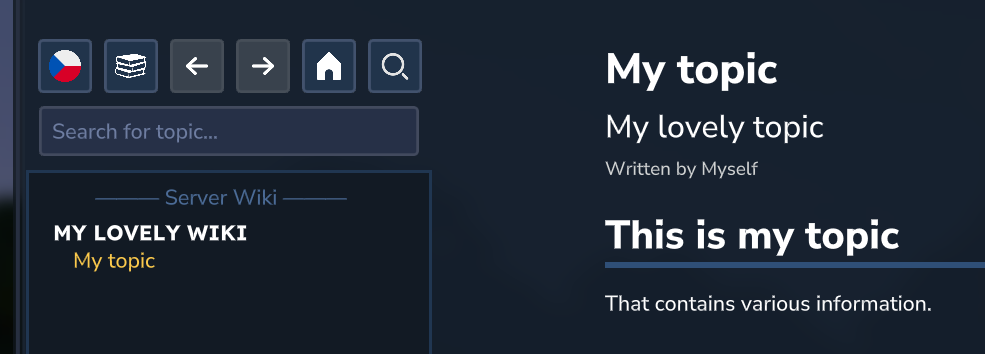
The result may look like this:
Creating a mod wiki
Create a documentation index file at
src/main/resources/Common/Docs/{YourModGroup}_{YourModName}.jsonin your mod's resourcesAdd a new documentation entry with your mod's group, documentation ID and a name.
Make sure to include the compatibility field with enabled
universalDocumentationLoaderoptionCreate a folder named after your mod's group and documentation ID next to the documentation index file
Create a Markdown file within the created folder with any name
Reinstall the mod and restart the server
The result may look like this:
Further reading
This topic shows just the bare basics of Voile. Please check out other topics that will teach you all the other features of Voile.